Currently Empty: ₹0.00

Microsoft excel with ai copilot training for Freshers & Career Switchers: Your Complete 2026 Roadmap to a High-Paying Job
April 16, 2026

Microsoft excel with ai copilot training for Freshers & Career Switchers: Your Complete 2026 Roadmap to a High-Paying Job
You do not need a computer science degree.
You do not need five years of Excel experience.
You do not need to know how to code.
What you need in 2026 is the ability to work with data intelligently — and
Microsoft Excel with AI Copilot training has made that
achievable for anyone willing to invest 6 to 8 weeks in structured learning.
Whether you are a fresh graduate about to enter the job market,
a professional from a non-data field who wants to switch careers,
or a working individual who has been using basic Excel for years and wants to finally level up —
this guide is written specifically for you.
We will cover exactly what to expect from a structured
Microsoft Excel with AI Copilot training course,
how your background becomes an advantage rather than a barrier,
real career paths and salary expectations, and how
Cambridge Infotech’s Advanced Excel programme
in Bangalore turns complete beginners into job-ready professionals.
Why Freshers Should Learn Microsoft Excel with AI Copilot training Before Anything Else
If you are a fresh graduate deciding what skill to invest in first, you face a noisy market:
Python, SQL, Power BI, Data Science, Machine Learning — everyone seems to be recommending
something different. Here is why Microsoft Excel with AI Copilot training
is the smartest first step for most freshers:
It Is the Skill Interviewers Test in Round One
At almost every company in India that hires analyst, executive, or associate profiles —
whether it is a BFSI firm, an IT services company, an e-commerce giant, or a consulting firm —
the first round of technical assessment is Excel-based.
A pivot table task. A formula challenge. A data cleaning exercise.
Candidates who arrive with strong Microsoft Excel with AI Copilot training capability
do not just pass these tests — they complete them visibly faster and with greater accuracy
than candidates who only know basic Excel.
That impression sticks with the interviewer.
It Gives You an Immediate Productivity Advantage on Day One of the Job
Companies want new hires who contribute fast.
A fresher who can build a management dashboard, automate a weekly report,
or clean a 20,000-row dataset in the first week of employment makes an immediate impression
on their manager. That is the reputation that gets you the stretch projects,
the cross-functional exposure, and eventually the promotion conversation — all within the first year.
It Is the Fastest Path from Zero to Employable in Data
According to
NASSCOM,
the average time-to-employment for graduates who complete a job-focused Excel and data analytics
course is 45 to 60 days post-graduation — significantly faster than Python or SQL training,
which typically take 3 to 6 months to reach a comparable job-ready standard.
For a fresher who needs to start earning, that speed difference matters enormously.
It Creates a Foundation Every Other Data Skill Builds On
SQL operates on tables — just like Excel.
Python pandas uses DataFrames — just like Excel worksheets.
Power BI dashboards are built from structured data — just like Excel pivot tables.
Learning Microsoft Excel with AI Copilot training properly means you arrive at every
subsequent data course already understanding the core concepts.
Cambridge Infotech’s
Data Analytics course
and
Power BI training
are natural next steps that build directly on the Excel + Copilot foundation.
The Career Switcher’s Advantage: Why AI Copilot Removes the Biggest Barrier
For years, the hardest part of switching into a data-related role from a non-technical background
was the steep formula and syntax learning curve.
Memorising VLOOKUP arguments. Understanding how nested IF logic works.
Knowing when to use INDEX-MATCH instead of VLOOKUP.
These were real barriers for professionals whose core strength was domain knowledge —
finance, HR, operations, marketing — rather than technical Excel proficiency.Microsoft Excel with AI Copilot training removes that barrier almost entirely.
When you use AI Copilot, you describe what you want in plain English — and the AI generates
the formula, the pivot table, or the chart for you. Your domain expertise becomes your advantage:
a former HR professional who understands what attrition analysis should look like is far better
at directing Copilot than a technical user who has never worked in HR.
Your years of business experience make you a more effective Copilot user, not a less effective one.
Who Is Switching Careers into Excel + Data Roles in 2026?
- Teachers and trainers moving into corporate L&D analytics and HR reporting
- Retail and customer service executives transitioning into operations analysis and sales reporting
- Bank tellers and back-office staff upskilling into financial analytics and MIS roles
- Healthcare administrators moving into health data reporting and compliance tracking
- Marketing coordinators stepping into performance analytics and campaign ROI roles
- Logistics and supply chain coordinators transitioning into demand planning and inventory analytics
What all these switchers have in common is that their existing domain knowledge —
combined with new Excel with AI Copilot skills —
creates a profile that is genuinely hard to find in the job market.
Most data analysts are technical but lack deep domain context.
A career switcher who combines both is a rare and valuable hire.
Real talk: The most common objection career switchers raise is “I am too old to learn tech skills.”
The average age of Cambridge Infotech’s Excel and data analytics students is 27.
The oldest student to complete the Advanced Excel + AI Copilot course and get placed was 44.
Domain experience accelerates your learning — it does not slow it down.
Does Your Educational Background Matter? A Practical Guide by Degree
One of the most common questions before enrolling in an
Excel with AI Copilot course is whether your specific educational
background qualifies you. Here is a direct, honest answer for every major profile:
B.Com / M.Com / CA Students and Graduates
You are among the best-positioned learners for this course.
Your accounting and financial knowledge gives every Excel formula and dashboard you build
an immediate real-world context.
AI Copilot’s financial modelling capabilities — budget variance, P&L analysis, cash flow tracking —
align directly with what you already understand theoretically.
After completing the course, roles like Financial Analyst, Accounts MIS Executive,
and Cost Controller Analyst are directly accessible.
Cambridge Infotech’s
MIS Data Management course
pairs particularly well with your finance background.
BBA / MBA Students and Graduates
Business management graduates bring strategic thinking to data work.
Excel with AI Copilot gives you the technical execution capability to match
that strategic lens. MBA graduates who add this skill move naturally into Business Analyst,
Strategy Analyst, and Operations Analytics roles — positions that often pay ₹8 to ₹15 LPA
in Bangalore’s consulting and technology sectors.
BCA / B.Tech / MCA Students and Graduates
Technical graduates often underestimate Excel — assuming it is beneath their programming capability.
The reality is that most corporate data work lives in spreadsheets, not IDEs.
Technical students who learn AI Copilot in Excel properly unlock
a uniquely powerful combination: the ability to build Python scripts that run inside Excel cells
via Copilot, connect Excel to live APIs, and automate complex multi-sheet workflows.
For technical graduates who want to extend into full data pipelines,
Cambridge Infotech’s Advanced Python course
builds directly on the Excel + Copilot foundation.
BA / BSc / Arts and Science Graduates
Non-technical graduates consistently surprise themselves in Excel + AI Copilot training.
Copilot’s natural language interface is an equaliser — it rewards clarity of thinking
and domain understanding far more than technical background.
A psychology graduate who can clearly articulate what a student performance analysis
should show will direct Copilot more effectively than a programming graduate
who has never thought about what the analysis is actually for.
Starting with Cambridge Infotech’s
Basic Excel course
gives you the 2-week foundation before progressing to the advanced AI features.
Diploma Holders and Vocational Graduates
Diploma holders in commerce, IT, or technical fields regularly complete the
Excel with AI Copilot programme and get placed in analyst roles.
The course is structured to accommodate learners at every academic level — what matters
is the practical output of the training, not the certificate you arrived with.
What Your First 30 Days of Learning Microsoft Excel with AI Copilot training Will Actually Look Like
Many freshers and career switchers worry about the first few weeks of a new course —
not knowing what to expect makes it hard to commit.
Here is an honest, week-by-week picture of what the opening month of an
Excel with AI Copilot course looks like at Cambridge Infotech:
Week 1 — “I Did Not Realise Excel Could Do This”
The first week covers Excel fundamentals: the interface, entering and organising data,
basic formulas (SUM, AVERAGE, IF, COUNT), sorting, and filtering.
For complete beginners, this week often produces a pleasant surprise —
Excel is more intuitive than expected, especially when a live trainer walks through
real business scenarios rather than abstract examples.
By the end of Week 1, every student has built their first structured data table and
run their first formula-based calculation on a real dataset.
Week 2 — “So That Is What VLOOKUP Is Actually For”
Week 2 introduces lookup functions (VLOOKUP, XLOOKUP, INDEX-MATCH),
nested formulas, data validation, and named ranges.
This is typically the week that divides students with previous Excel exposure
from complete beginners — but with instructor guidance and step-by-step practice,
even absolute newcomers reach functional fluency with lookups by Week 2’s end.
Trainers introduce the first simple
AI Copilot prompts
here — asking Copilot to explain what a formula does, which quickly builds confidence
in both tools simultaneously.
Week 3 — “Copilot Just Did in 2 Minutes What Took Me 2 Hours Last Week”
Week 3 is when the course’s energy typically peaks.
Pivot tables, pivot charts, slicers, and the first full AI Copilot integration session
happen here. Students use Copilot to build pivot tables from natural language prompts,
ask it to identify trends in a sales dataset, and generate their first AI-assisted chart.
The reaction is almost universal: disbelief at how much output a single
well-formed Copilot prompt produces.
By the end of Week 3, every student has used AI Copilot in Excel to
complete a real analysis task they could not have done manually in the same time.
Week 4 — Building Something You Are Proud Of
Week 4 focuses on conditional formatting, dynamic arrays, the UNIQUE/FILTER/SORT function family,
and the first complete dashboard project.
Students choose a real business dataset — sales, HR, finance, or operations —
and build an interactive dashboard from scratch.
This is the first portfolio piece.
It is also typically the point at which career switchers realise that their previous
domain experience is a genuine asset — they know exactly what a good HR dashboard
or a useful sales report looks like, because they have been the end-user of such reports
for years.
By Day 30, the typical Cambridge Infotech student who started with zero Excel experience
has built one working dashboard, completed four guided data analysis exercises,
and used Excel with AI Copilot to solve real business problems that
would previously have required a senior analyst’s help.
Jobs You Can Target and Salaries You Can Expect After the Course
The question every fresher and career switcher asks before investing in training is:
“What can I realistically earn after completing this?”
Here is an accurate, 2026 picture of the Bangalore job market for
Microsoft Excel with AI Copilot training graduates:
| Job Role | Who Typically Gets It | Salary Range (Bangalore) | Key Skills Required |
|---|---|---|---|
| MIS Executive | Freshers, 0–1 year exp | ₹3.5–6 LPA | Advanced Excel, dashboards, data reporting |
| Junior Data Analyst | Freshers & career switchers | ₹4–7 LPA | Excel, AI Copilot, basic SQL, pivot analysis |
| HR Analytics Executive | HR background + Excel skills | ₹4–8 LPA | Excel dashboards, Copilot, headcount tracking |
| Financial Analyst (Junior) | Commerce graduates | ₹5–9 LPA | Advanced Excel, financial modelling, Copilot |
| Operations Analyst | Operations background switchers | ₹5–9 LPA | Excel automation, KPI dashboards, reporting |
| Business Analyst | MBA + Excel + 1–2 yrs exp | ₹7–14 LPA | Excel, Copilot, Power BI, stakeholder reporting |
| BI / Reporting Analyst | Excel + Tableau/Power BI combo | ₹7–15 LPA | Excel, AI Copilot, Power BI or Tableau |
The salary jump from MIS Executive to Business Analyst or BI Analyst — roughly ₹3.5 LPA to ₹14 LPA —
is primarily driven by two factors: the depth of Excel + Copilot skill and the addition of
a complementary visualisation tool.
Cambridge Infotech offers a clear progression path:
Advanced Excel + AI Copilot →
Power BI
→
Tableau
— each course stacking on the previous one to build a profile
that commands the higher end of the market.
How to Build a Job-Winning Portfolio During Your Microsoft Excel with AI Copilot training Course
The single difference between a fresher who gets called for interviews and one who does not —
when both have the same certificate — is a portfolio.
Recruiters hiring analyst roles do not just want to see that you completed a course;
they want to see what you can build.
Here is how to build a portfolio that gets you shortlisted while you are still in your
Excel with AI Copilot training:
Project 1 — Sales Performance Dashboard (Week 4–5)

Use a publicly available sales dataset from
Kaggle
or one provided by your trainer.
Build an interactive dashboard that shows monthly revenue, top products, regional performance,
and target-vs-actual comparisons.
Use Copilot to generate the conditional formatting and the plain-English trend summary panel.
Save the file and screenshot the final output for your LinkedIn profile and resume.
Project 2 — HR Attrition Tracker (Week 5–6)
Download any anonymised HR dataset and use AI Copilot to help you identify attrition patterns
by department, tenure, and salary band.
Build a pivot-based summary with slicers for manager-level filtering.
This project is particularly powerful for career switchers from HR backgrounds because you
can speak confidently about the business context of the analysis in interviews.
Project 3 — Financial Budget vs Actual Report (Week 6–7)
Create a multi-sheet financial report that pulls budget data from one sheet,
actual spend from another, calculates variance using Copilot-generated formulas,
and highlights over-budget categories with automated conditional formatting.
Finance-sector interviewers consistently cite this type of project as the most
convincing portfolio evidence they see from applicants.
Capstone Project — Your Industry, Your Problem
The most memorable portfolio piece is always the one where you identify a problem
from your own past work experience — even if that experience is in retail, education,
healthcare, or any non-data role — and build an Microsoft Excel with AI Copilot training
solution for it.
A teacher who builds a student performance tracker. A retail supervisor who builds a
store-level inventory dashboard. These projects demonstrate both technical skill and
the business judgement that separates a good analyst from a great one.
Portfolio tip: Upload every completed project to a
GitHub
repository and link it in your LinkedIn profile. Recruiters who receive your application
and see an active GitHub with Excel projects and a professional LinkedIn summary
place you in a different category than candidates who only have a PDF resume.
For Managers and HR, Finance & Operations Professionals: Why This Course Is Different for You
If you are already employed in a management, finance, HR, or operations role and considering
Microsoft Excel with AI Copilot training training, your objectives are different
from a fresher’s — and the return on investment arrives faster.
Finance and Accounting Managers
The most immediate win for finance managers is the elimination of the manual monthly reporting cycle.
Most finance teams spend 20 to 40% of their working hours on recurring reports —
consolidating data from multiple sources, updating formulas, reformatting tables, and sending emails.
With Excel and AI Copilot, that cycle compresses dramatically.
Microsoft Copilot for Finance
— a dedicated layer built for CFO teams — is now included in Microsoft 365 enterprise plans,
meaning this is not a future investment; it is a current tool you may already have access to.
Cambridge Infotech’s
MIS Data Management course
is specifically designed for finance and operations managers who want to build automated
reporting systems that run with minimal ongoing manual effort.
HR Managers and HR Business Partners
People analytics is one of the fastest-growing functional specialisations inside HR.
Organisations are asking their HR teams to quantify everything — attrition costs,
diversity metrics, engagement score trends, recruitment funnel conversion rates.
HR managers who can build and maintain
Microsoft Excel with AI Copilot training dashboards for these metrics
become strategic partners to the business rather than administrators of it.
That shift in perception translates directly into seniority, influence, and compensation.
Operations and Supply Chain Managers
Demand forecasting, inventory optimisation, vendor SLA tracking, and logistics KPI management —
all of these are Excel-heavy domains where AI Copilot creates immediate, measurable time savings.
Operations managers who automate their weekly reporting with Copilot typically report freeing
up 4 to 8 hours per week that they can reinvest in analysis, team management, and strategic work.
Cambridge Infotech’s
MIS Database Design training
extends Microsoft Excel with AI Copilot training skills into structured database-driven reporting
systems — the natural evolution for operations teams whose data volumes have outgrown
single-workbook solutions.
Marketing and Business Development Managers
Campaign performance dashboards, customer acquisition cost tracking, channel ROI analysis,
and market penetration reports — marketing managers who build and maintain these in
Microsoft Excel with AI Copilot training gain the ability to make faster,
data-backed decisions and present findings to leadership with confidence.
For marketing professionals who want to extend into deeper customer segmentation and
predictive analysis, pairing Excel + Copilot training with
Cambridge Infotech’s Data Science course
creates one of the most in-demand profiles in digital marketing today.
What Successful Students Did Differently: 5 Habits of Top Cambridge Infotech Graduates
After training hundreds of Excel and data analytics students,
Cambridge Infotech’s instructors have observed five consistent habits
that separate the students who get placed quickly from those who struggle after the course.
These habits are free — they cost only intention.
Habit 1 — They Practised on Their Own Real Data, Not Just Training Datasets
The most effective learners bring their actual work problems into the course.
A student working in logistics brought their inventory reconciliation spreadsheet.
A finance student brought their company’s budget template.
When you practise on familiar data, your learning accelerates — and you leave with
a portfolio piece that is directly relevant to your target job.
Microsoft Excel with AI Copilot training is most powerful when it solves a problem
you already understand deeply.
Habit 2 — They Updated Their LinkedIn Profile on Week 1, Not Week 8
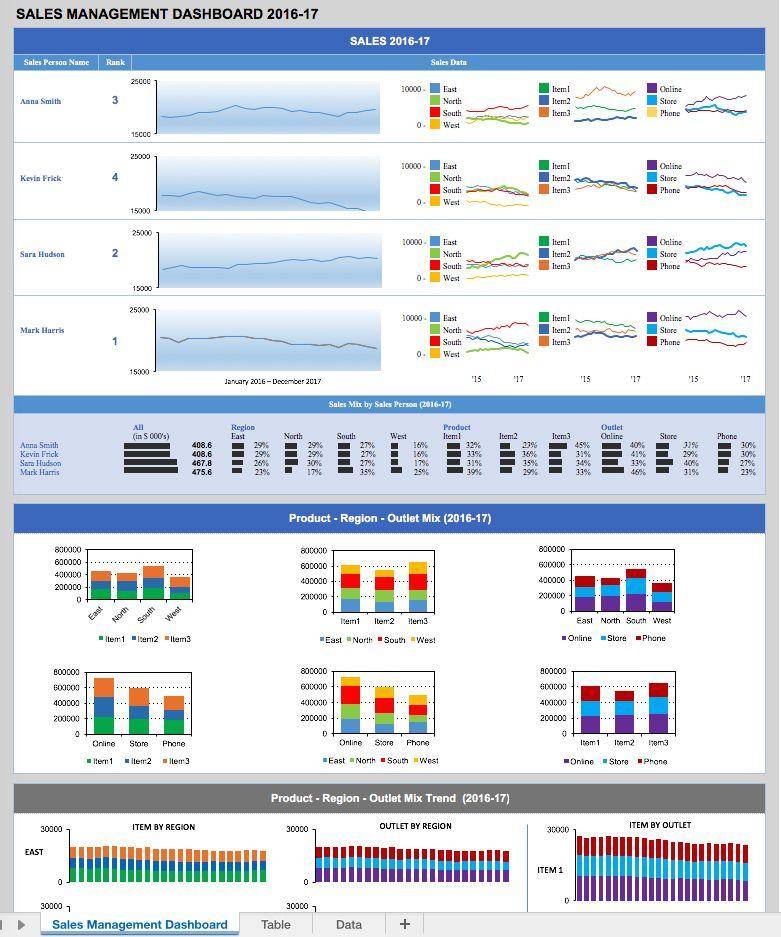
Top students do not wait until they have a certificate before announcing their learning journey.
Posting on LinkedIn about week-by-week progress, sharing dashboard screenshots, and writing
about what Microsoft Excel with AI Copilot training can do attracts recruiter attention weeks before
graduation. Some students receive interview invitations before the course is even finished.
Habit 3 — They Asked “Why” Not Just “How”
The best students do not just ask how to build a pivot table — they ask why a pivot table
is the right choice for this type of analysis, and when a regular formula table would be better.
That analytical thinking is exactly what separates a candidate who can follow instructions
from a candidate who can solve problems. Interviewers are testing for the latter.
Habit 4 — They Treated the Placement Process Like a Second Course
Cambridge Infotech provides resume review, mock technical tests, and interview preparation
as part of its placement support. The students who get placed fastest are those who engage
with that process as seriously as they engage with the Excel training itself.
They iterate on their resume. They repeat mock interviews until the answers feel natural.
They research the companies they are applying to before the first round.
Habit 5 — They Connected with Alumni
Cambridge Infotech has an active alumni network of placed graduates across BFSI, IT services,
e-commerce, and consulting companies in Bangalore.
Students who reach out to alumni on LinkedIn for informational conversations consistently
report getting referred to open roles, receiving specific interview preparation advice,
and understanding what a real analyst’s first year actually looks like —
information that no course curriculum can replicate.
Visit the
Cambridge Infotech contact page
to ask about connecting with the alumni network.
Frequently Asked Questions
1. Can a fresher learn Microsoft Excel with AI Copilot training with zero experience?
Absolutely. Excel with AI Copilot is designed for users at all levels.
A structured beginner-to-advanced course — like the one at
Cambridge Infotech
— builds your Excel foundation first, then layers in AI Copilot features progressively.
Most freshers are job-ready within 6 to 8 weeks.
2. Is Microsoft Excel with AI Copilot training a good skill for career switchers?
Yes — it is one of the fastest high-value skills a career switcher can add.
Copilot’s natural language interface means your domain expertise from your previous career
becomes an advantage: you understand the business context of the data you are analysing,
which makes you a better analyst than a purely technical hire who lacks that context.
3. What jobs can a fresher get after learning Microsoft Excel with AI Copilot training?
MIS Executive (₹3.5–6 LPA), Junior Data Analyst (₹4–7 LPA), HR Analytics Executive (₹4–8 LPA),
Junior Financial Analyst (₹5–9 LPA), and Operations Analyst (₹5–9 LPA) are the most common
first roles for Cambridge Infotech graduates in Bangalore.
Adding a complementary tool like
Power BI
opens the BI Analyst and Business Analyst tiers at ₹7–15 LPA.
4. How is Microsoft Excel with AI Copilot training different from just learning Excel?
Traditional Excel training teaches manual formula writing and chart building.
Excel with AI Copilot training teaches all of those same skills
AND how to direct the AI to write formulas, generate analysis, clean data, and build dashboards
through natural language — giving you the output of a senior analyst at the speed of a single prompt.
5. I come from a non-technical background. Can I still learn Microsoft Excel with AI Copilot training?
Yes — and you are actually well-suited for it. Copilot’s biggest strength is converting plain English into technical Excel output. Professionals from commerce, arts, business management, or any non-IT background adapt very naturally to the prompt-based interface.
Starting with Cambridge Infotech’s
Basic Excel course
before the advanced programme removes any concern about starting too far behind.
6. How long does it take to switch careers using Microsoft Excel with AI Copilot training?
Most career switchers who complete a structured 6 to 8 week course and build a portfolio
of 3 to 5 dashboard projects are able to start applying — and receiving responses —
within 60 to 90 days. Cambridge Infotech’s dedicated
placement team
shortens this timeline by actively connecting graduates with open roles in Bangalore.
7. What degree do I need to learn Microsoft Excel with AI Copilot training?
None specifically. B.Com, BBA, BCA, B.Tech, BA, BSc, diploma, and even 10+2 candidates
complete the course and get placed every batch.
What matters is the portfolio you build during training — not the certificate you arrived with.
8. What is the first step to start learning Microsoft Excel with AI Copilot training?
The first step is enrolling in a structured programme that builds from Excel fundamentals
through to AI Copilot mastery — not watching disconnected YouTube videos that leave gaps
in your knowledge.
Cambridge Infotech offers both weekday and weekend batches with flexible timing for freshers and
working professionals.
Speak to an advisor
to find the batch that fits your schedule and starting level.
Your Career Switch Starts Here
Join Cambridge Infotech’s Microsoft Excel with AI Copilot Training course —
designed for freshers, career switchers, and professionals who are serious about getting hired fast.
Zero experience required · Weekday & weekend batches ·
Portfolio projects included · 100% placement support
Call / WhatsApp: +91 99024 61116 |
enquiry@cambridgeinfotech.io